
Desktop Pro
What is Desktop Pro?


Desktop Pro Model Assembler is a new exciting addition to our family of FinRobot products. Unlike the rest of our online Models, Desktop Pro offers users a unique experience of assembling models off-line from their own desktops or laptops. As no online interaction with our site is required, Desktop Pro is essentially a mini FinRobot.com owned and operated by you with no strings attached.
How does it work?
The Desktop Pro is a single xlsm file, which includes FinRobot proprietary model assembly algorithm and a user interface. Users can download and open Desktop Pro on their PCs. No installation is required provided your PC has a valid copy of Microsoft Excel. Model assembling algorithm is hidden behind a simple user interface:
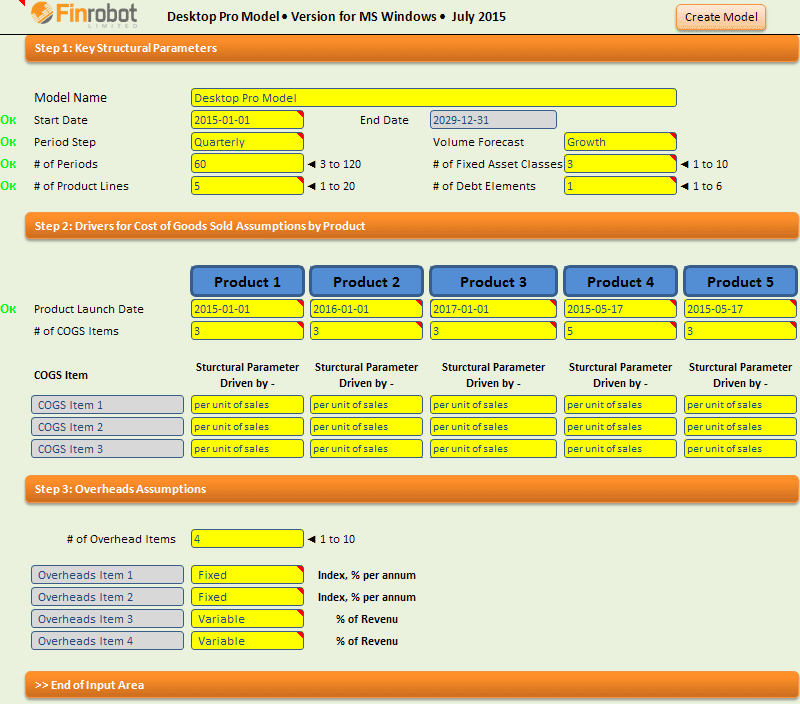
Set the dials to desired options, click 'Create Model' and a new xls model is spun. Like this. Again and again.
What models can Desktop Pro generate?
As can be inferred from the interface, Desktop Pro's architecture is based on our two most popular online models – Base and Manufacturing. Users can switch between the logic of the two models plus scale up their models relative to what we presently offer online.
The table below compares Desktop Pro and Base / Manufacturing models:
|
|
Desktop Pro Model |
||||
|
Engine and Interface: |
|||||
|
Assembler Interface |
On-line |
Downloadable xlsm file |
|||
|
Assembler Engine |
FinRobot’s server, no user access to assembler engine |
Executable code placed inside user file, no access to FinRobot’s server required |
|||
|
# of models per purchase |
1 |
1 |
Unlimited |
||
|
Populate Assumptions during Assembly Stage |
Yes, but can be skipped and done inside purchased live model |
No, live model can be generated instantly |
|||
|
Demo Version / Preview |
Yes, demo file downloadable from FinRobot’s server for free |
No, live model can be generated instantly |
|||
|
Delivery Time |
5 to 20 minutes depending on how busy our server is |
Instant delivery from seconds to minutes depending how powerful your PC is |
|||
|
Output Model Parameters: |
|||||
|
# of Time Intervals: |
3 - 60 |
3 - 120 |
|||
|
Time Interval Step Options: |
Monthly, Quarterly or Annually |
||||
|
Revenue Driver: |
Volume * Price per Product |
Time * Output Rate * Price per Product |
Choose between Volume and Time * Output Rate |
||
|
# of Product Lines |
1 - 5 |
1 - 10 |
1 - 20 |
||
|
# of COGS for each Product Line |
5 |
1 - 10 |
1 - 10 |
||
|
Choice of COGS Drivers: |
% of Revenue |
- |
% of Revenue |
||
|
Ability to Vary COGS # for Individual Product Lines |
No |
No |
Yes |
||
|
Ability to Forecast Price per Unit for Individual COGS |
No |
Yes |
Yes |
||
|
# of Overhead Items |
5 |
1 - 5 |
1 - 10 |
||
|
Type of Overhead Drivers |
Fixed or Variable |
||||
|
Balance Sheet Structure: |
|
||||
|
# of Fixed Assets Classes: |
1 - 5 |
1 |
1 - 10 |
||
|
# of Debt Instruments: |
Overdraft + 4 |
Overdraft + 1 |
Overdraft + 5 |
||
|
# of Working Capital Items: |
5 |
6 |
|||
|
CAPEX and depreciation: |
Matches number of Assets Classes available |
||||
|
Annual Summary |
Yes, standard for any chosen step interval |
||||
|
DCF |
Yes, separate NPV and IRR calculator tab |
||||
Close
Who is Desktop Pro for?
Desktop Pro is specifically designed for users with high volume modelling requirements. Users can generate as many end models in Excel as they like at no additional costs. VBA savvy users can also customise what end models Desktop Pro can generate. Alternatively, FinRobot team can produce a bespoke version of Desktop Pro upon request.
How do I get Desktop Pro?
Please email us at Info@FinRObot.com expressing your interest in Desktop Pro. Please provide a quick narrative what you intent to use Desktop Pro for and whether you require any bespoke features added to the model.
Interested in learning more? - Request Call now